Game Controller Graphics & Illustrations Review
As someone who has spent years running a handmade business and filling orders for everything from custom tumblers to planner stickers, I know that the right graphic design asset can make or break a product line. When I first opened the Game Controller Vector Icon Bundle, my immediate thought was about versatility. This isn't just a pack of clipart; it is a toolkit for tapping into the massive gaming community. The mood here is clean, modern, and slightly retro, striking a balance that appeals to both serious gamers and casual hobbyists. It feels minimal yet bold, which is exactly what you need when working with vinyl or sublimation where too much detail can get lost.
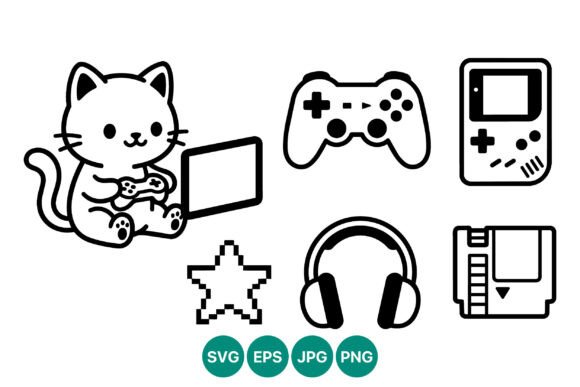
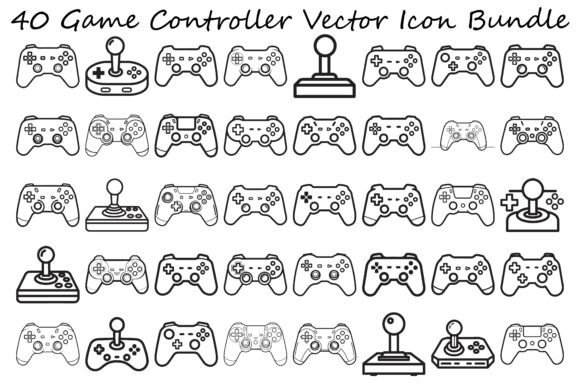
The collection features forty distinct icons, ranging from classic retro gamepads to sleek modern joysticks, all rendered in a crisp black-and-white outline style. For an Etsy product creator, this aesthetic is gold. It suggests a premium, uncluttered look that works beautifully on white mugs, dark t-shirts, and clear sticker sheets. If you are targeting customers who love tech, esports, or nostalgic arcade vibes, these illustrations provide the perfect visual hook without overwhelming your design layout.
Real-World Applications for Cricut and Silhouette Users
Let's talk about how this bundle fits into an actual workflow. Imagine you are preparing for a local craft fair or fulfilling a bulk order for a birthday party. The clean lines of these graphics make them ideal for Cricut projects and Silhouette projects. Because they are vector-based, you can scale them up for a large tote bag or down for a tiny gift tag without losing quality. I immediately envisioned using these for a "Gamer Party" collection. You could cut the controller shapes out of black heat transfer vinyl (HTV) for t-shirts, or use them as stencils for painting wooden signs.
For those of us making sticker designs, the outline style is particularly forgiving. It allows the background of the sticker paper to show through, creating a transparent, professional look that doesn't require complex weeding if you are using print-and-cut methods. These icons work exceptionally well as decorative accents on planner pages or as standalone elements in a scrapbook layout dedicated to hobbies and leisure time.
Sublimation and Printable Design Opportunities
If your handmade business leans more towards full-color products, this bundle still holds immense value. While the source files are black and white outlines, they serve as excellent bases for sublimation design. You can easily recolor these vectors in your design software to match specific team colors, school spirits, or seasonal themes before printing. I tested a few of these on a tumbler wrap mockup, pairing the controller icon with a bold sans-serif font, and the result was striking. The high contrast ensures readability even on curved surfaces.
Furthermore, these assets are perfect for printable design products. Think about digital planners, printable wall art for a teen's bedroom, or thank-you cards included in your shipping packages. A simple black controller icon on a white cardstock tag adds a nice touch of small business branding that feels cohesive and thoughtful. You can also incorporate these into product mockups to showcase other items in your shop, giving your listings a unified, professional appearance on the creative marketplace.
Technical Considerations for Crafters
However, every designer knows that not every file is ready for production straight out of the download folder. Before you list these as part of a commercial design offering, there are practical steps you must take. First, always test the file. Open the SVGs in your cutting software to ensure the lines are closed and clean. Sometimes, outline styles can have tiny gaps that cause issues during the weeding process for intricate vinyl cutting jobs.
You also need to be mindful of scale. While these design assets look great at medium to large sizes, very small cutting details might struggle if you are using lower-quality vinyl or a dull blade. If you are creating small sticker sizes, ensure the lines are thick enough to remain visible and durable after cutting. Additionally, check the resolution if you plan to convert these to PNGs for print-on-demand services. Confirm that the transparency is clean and there are no unwanted white boxes around the black outlines.
Color testing is another crucial step. Even though the original files are black and white, how they look on dark versus light products varies. On a black t-shirt, a black outline obviously won't work unless you add a white backing layer or change the color entirely. Always place your design on real mockups or physical samples to see how the contrast performs in natural lighting.
Styling and Font Pairing Tips
To truly maximize the potential of this design bundle, consider how you pair it with typography. The geometric nature of the controllers pairs wonderfully with modern sans-serif fonts for a tech-forward look. Alternatively, mixing these retro-style icons with a handwritten or script font can create a fun, approachable vibe perfect for kids' birthday invitations or casual apparel. Avoid overly ornate serif fonts that might clash with the clean, minimalist lines of the gamepads.
Remember to simplify your layout if needed. With forty different icons available, it is tempting to use them all, but often less is more. A single, well-placed controller icon often communicates the message more effectively than a crowded composition. Use these Illustrations to highlight specific areas of your product rather than covering the entire surface.
Final Verdict for Handmade Sellers
In conclusion, the Game Controller Vector Icon Bundle is a robust resource for any crafter looking to expand into the gaming niche. Whether you are creating a mug design for a father's day sale, a t-shirt design for an esports team, or custom packaging for your online store, these graphics provide a solid foundation. They save you the time of drawing complex shapes from scratch while offering the flexibility of vector editing.
Just remember to verify your commercial license terms before selling finished goods. Most bundles on creative marketplaces allow for physical end products, but restrictions on reselling the digital files themselves are standard. By testing your cuts, checking your colors, and styling your layouts thoughtfully, you can turn this collection of Graphics into a best-selling segment of your handmade inventory. It is a practical, high-value addition to your digital library that bridges the gap between retro nostalgia and modern crafting trends.